
Skilltech One

Linking your SkilltechOne account to Proficient

Enable Single Sign-On (SSO) for your Proficient account by linking with SkilltechOne. Follow our simple guide to connect your accounts and streamline your login process.

You can link your SkilltechOne account to your existing Proficient user(s) to provide Single Sign On (SSO) functionality.

Link your account

To link your SkilltechOne account in Proficient

Click on your Profile in the top right

Click on Edit your profile in the menu

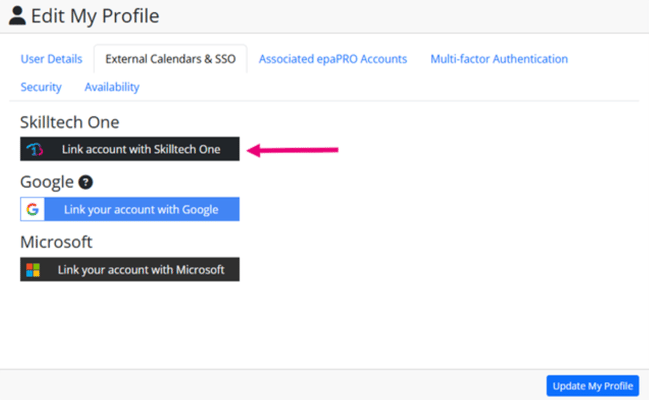
Select the External Calendars & SSO tab

Click the Link your account with SkilltechOne button

Skilltech One - Link your account

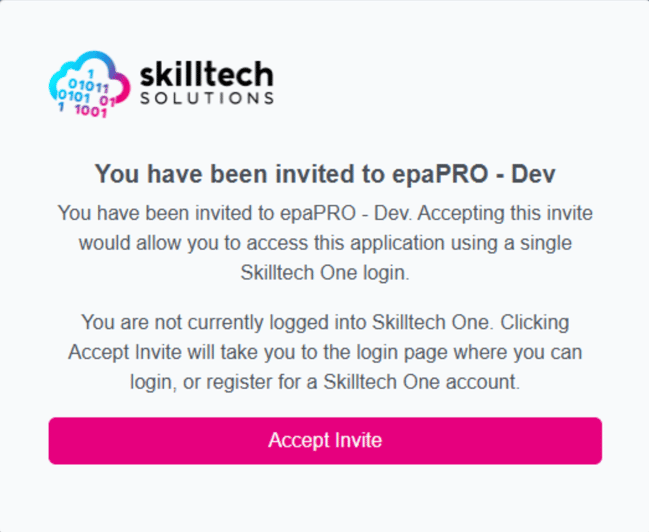
This will re-direct you to SkilltechOne and display the invite details of the Proficient instance you are linking. 

Skilltech One - Invite

To link your account click Accept Invite.

Similar posts

Better information, better outcomes.

It’s not just Skilltech’s software that gives you richer insights that will help your learners achieve more.

You can receive regular updates from Skilltech straight to your inbox with need-to-know information about the awarding and assessment technology that will make managing assessments a breeze.

Stay up to date